The Complete Guide to Interactive WebGL Product Visualization
WebGL product visualization for manufacturers: real-time rendering, 360-degree views, AR, live options and pricing, and when a 3D viewer needs a configurator.
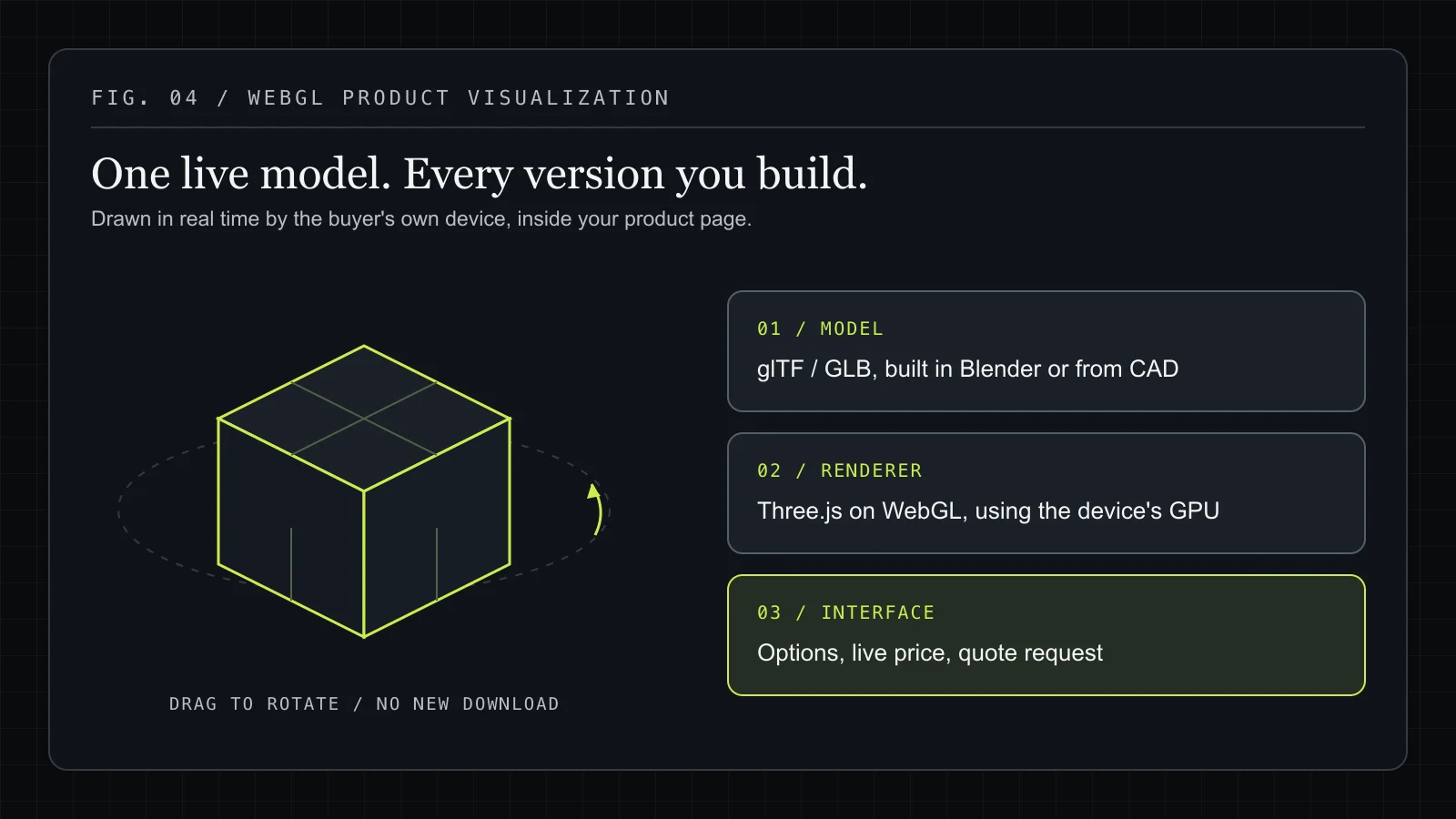
WebGL product visualization means showing a product as a live 3D model on your website, drawn in real time by the buyer's own device through the browser's WebGL API. Buyers rotate it, zoom in, and change finishes, sizes or parts while the model updates on screen. For manufacturers that sell made-to-order or high-value products, it replaces a gallery of fixed photos with one model that can show every version you actually build.
This guide covers how browser-based 3D works, what it does for buyers of configurable products, how real-time rendering, 360-degree views and AR fit together, and when a 3D viewer should grow into a full 3D product configurator. We build these for manufacturers, so the examples come from our own demo and published case studies.
What is WebGL product visualization?
WebGL product visualization is interactive 3D rendering of a product inside a normal web page, with no plugin, download or app. WebGL is a JavaScript API, standardized by the Khronos Group and built into every major browser, that gives a web page access to the device's GPU. Libraries such as Three.js sit on top of it and handle the scene: the camera, lights, materials, shadows and the loop that redraws the image many times per second.
A product visualization has three parts:
- A 3D model of the product, usually built in Blender or converted from CAD, and exported as glTF or GLB, the compact web format for 3D.
- A renderer that draws that model in the browser and responds to the buyer's mouse, finger or keyboard.
- An interface around the model: option buttons, a price, a spec summary, a quote button.
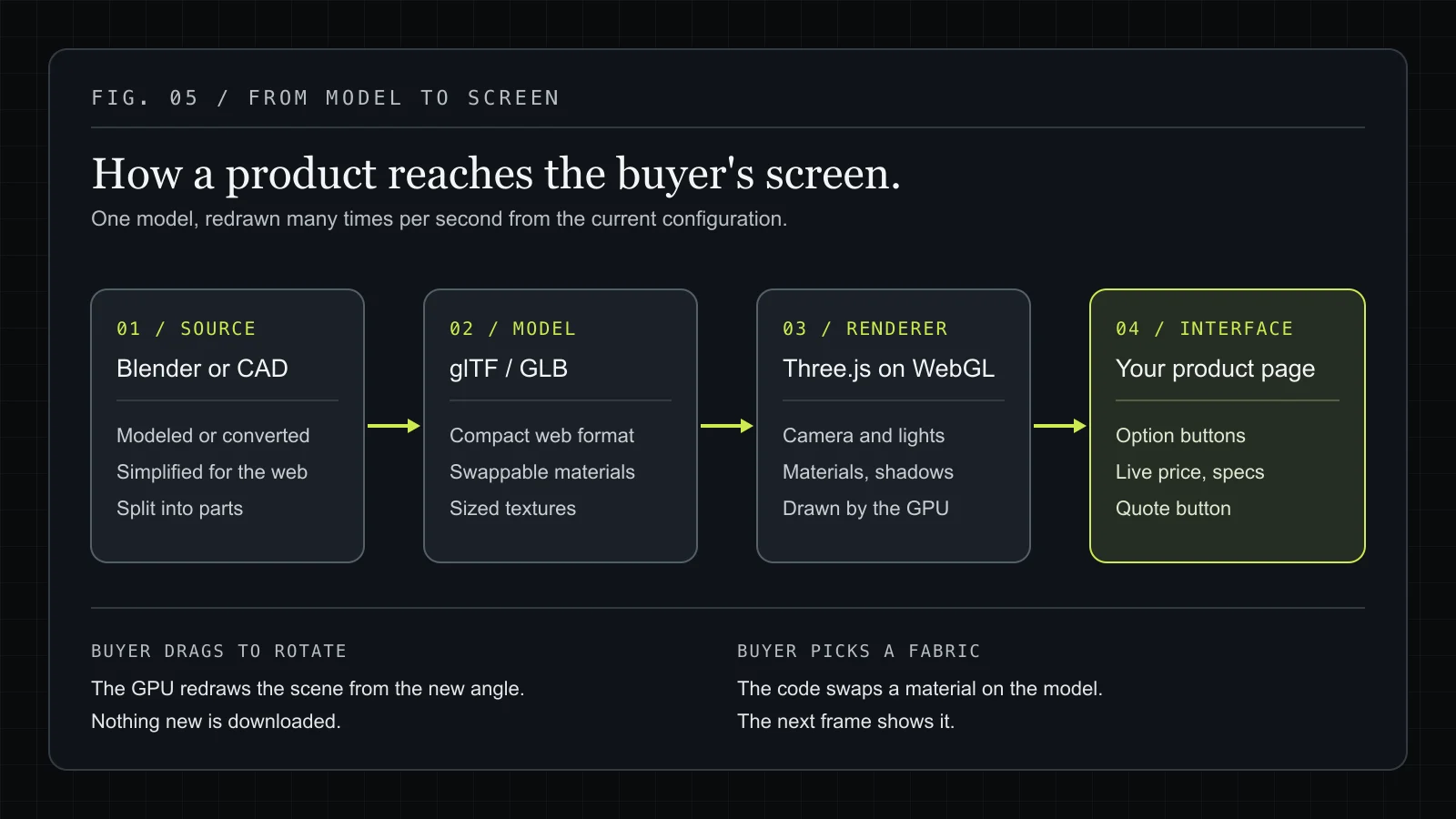
When the buyer drags to rotate the product, nothing new is downloaded. The GPU recalculates the scene from the new angle. When they pick a different fabric, the code swaps a material on the model and the next frame shows it. That is what "real-time" means here, and it is why one model can stand in for hundreds of photos.
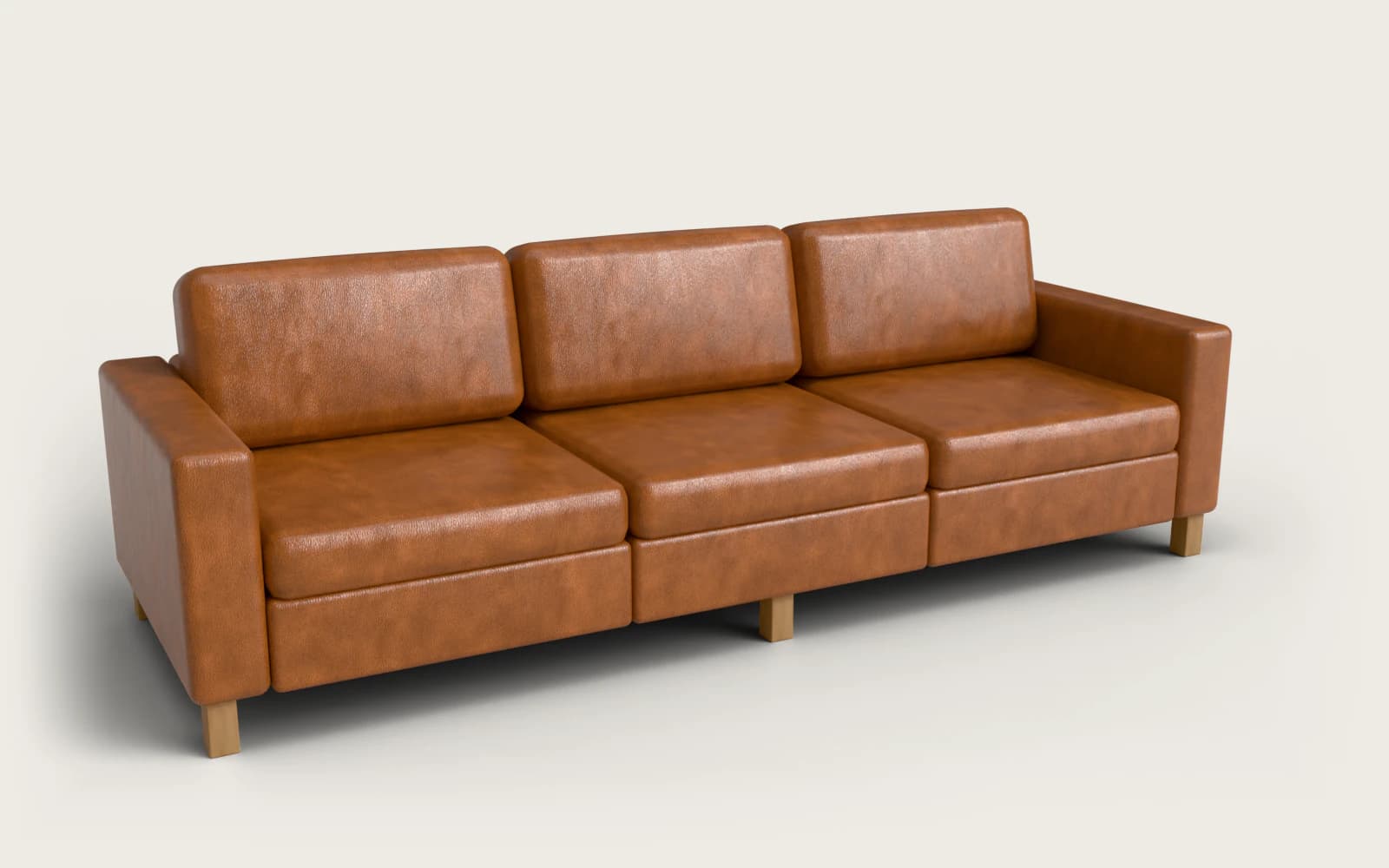
You can try it on our live modular sofa demo: change the layout, seat count, fabric and legs, and the model, the dimensions and the itemized price all follow.
WebGL visualization vs photos, video and image spins
Each way of showing a product answers a different buyer question. The table compares the common options.
| Product photos | Video | 360 image spin | WebGL 3D model | |
|---|---|---|---|---|
| Shows every variant | Only the ones you shoot | Only the ones you film | Only the ones you shoot | Every combination the model supports |
| Buyer controls the angle | No | No | Along one fixed path | Freely, within limits you set |
| Changes with options | Swap to another photo | No | Swap to another spin | Updates in the same view |
| Can show live dimensions | No | No | No | Yes |
| Can feed a price or quote | No | No | No | Yes, from the same configuration |
| Main cost driver | Each shoot | Each production | Each shoot | Building the model and logic once |
Photos still have a job. They show texture, styling and the real product in a real room better than anything rendered. Our comparison of 3D configurators and product photos goes through where each one wins. WebGL earns its place when the buyer's question is "what will my version look like?" and the number of possible versions is too large to photograph.
What makes browser-based 3D product experiences useful for manufacturers?
Browser-based 3D is useful to manufacturers because it lets a buyer see the exact product they are about to order, on the website they are already on, before anyone at the factory has built it. That matters most when the product is made to order, expensive, or both.
Three properties make the browser the right place for this:
- No install. A buyer comparing custom trailers or doors is unlikely to download an app just to see one. A WebGL viewer opens in the same tab as the product page, on desktop or phone.
- It lives inside your existing site. The viewer is a component on your product page, so it can sit next to your copy, your specs and your contact form. Ours are built to work inside Shopify, WooCommerce or a custom site without a platform rebuild.
- It shares data with the rest of the page. Because the 3D view runs in the same JavaScript as the page, the selection that drives the model can also drive the price, the spec table, a PDF, a cart item or a quote request.
A rendered model on its own is a sales asset. Connected to your option list and price rules, it also works as an order-entry tool. The quote request your sales team receives already names every option, instead of a vague "please send me prices" form.
The products where this pays off share a pattern: many options, physical dimensions that change, and a buyer who needs to check fit or appearance before committing. That covers furniture, vehicle and van conversions, doors and windows, trailers and industrial equipment, and sports surfaces. Our work pages show configurators across those categories.
How visual product customization helps buyers choose with confidence
Visual product customization lets the buyer make a choice and see its result on the product straight away, instead of reading an option name and imagining it. That closes the gap between "Walnut block" in an option list and what walnut legs look like under that particular sofa.
Good customization does more than swap colors. In practice it covers:
- Materials and finishes. Fabric, wood, metal, paint and glass, each with its own surface response to light. A bouclé reads differently from a velvet even in the same color, and the renderer has to show that.
- Components. Different arms, legs, handles, axles, racks or panels, each a separate part of the model that is shown, hidden or swapped.
- Dimensions. Width, length, height or number of modules, with the model resizing and, ideally, showing measurements. Our sofa demo shows overall dimensions (for example 272 × 160 × 89 cm for a three-seat chaise layout) and updates them as the layout changes.
- Rules. Some combinations cannot be built. A sofa maker might not offer leather on a deeply curved arm, because a hide cannot be tailored over the curve without visible seams. A good configurator blocks that pairing, tells the buyer why, and lets them undo the change.
That last point is where visualization and manufacturing meet. A customization tool that lets buyers design something you cannot make creates a worse sales conversation than no tool at all. Encoding "not with" rules as data, and explaining them in the interface, keeps every configuration that reaches your inbox buildable.
The confidence a buyer gets comes from seeing their own configuration, from their own angle, with the price that goes with it. For enquiry-led businesses that also means better leads: a prospect who has already chosen materials, size and accessories is further along than one who filled in a blank contact form.
How real-time product rendering supports configurable products
Real-time product rendering is what lets a configurable product be shown without pre-rendering every combination. The browser draws each frame on demand from the current configuration, so adding a new option means adding a material or a part to the model, not producing a new batch of images.
Getting rendering right for products, rather than for games, comes down to a handful of decisions.
Physically based materials
Three.js uses physically based rendering (PBR), where a material is described by properties like base color, roughness and metalness, plus texture maps for grain, weave and small surface bumps. Real fabric and wood scans give the most convincing results. Our sofa demo uses CC0-licensed fabric scans for its upholstery options.
Lighting that flatters the product
Products are usually lit with an environment map (an HDRI) that wraps the model in realistic studio light and gives metal and lacquer something to reflect. The sofa demo pairs a studio HDRI with one shadow-casting key light set beside it, so cushions and arms shade each other, plus a soft shadow under the product. That keeps it looking like a catalog shot rather than a game scene.
Assets built for the web
Production CAD is far too heavy for a browser. Models need to be converted, simplified and exported as glTF/GLB, with texture sizes chosen for the screen they will appear on. This is often the biggest single piece of preparation in a project, and it is why our quotes include 3D modeling and web optimization.
Loading that does not hurt the page
A 3D scene is the heaviest thing on a product page, so it should load after the content a buyer and a search engine need first. On our demo pages, the 3D canvas loads only when the browser is idle, when the viewer scrolls into view, or on the first real interaction. Three.js is kept out of the initial page bundle. The marketing homepage has no live WebGL canvas at all.
A fallback for devices without WebGL
Nearly every current device supports WebGL, but not all. Our viewer checks for support first and, if it is missing, shows a pre-rendered still of the product, lit the same way as the live scene, while the options and the price keep working. A buyer on an old device still gets a usable page.
When rendering is handled this way, the configurable product stays fast to load, accurate to look at, and cheap to extend when your range changes.
Using 360-degree product views for complex products
A 360-degree product view lets the buyer look at the product from any side, which matters most when the important details are not on the front. A trailer's axle layout, the back of a modular sofa that will sit in the middle of a room, the hinge side of a door: a front photo hides all of them.
There are two ways to deliver a 360-degree view:
- An image spin is a sequence of photos or renders taken around the product. It is simple, but it only shows the frames that were captured, usually along one horizontal path, and it has to be reshot for every variant.
- A WebGL orbit view renders the model from wherever the buyer drags the camera. It covers every angle and every variant from one model.
Free orbiting needs limits to stay useful. A good viewer limits how far the buyer can zoom and tilt (the sofa demo's camera stops short of looking straight down) and adds camera presets, buttons that move the camera to a known good angle. The sofa demo has four: a three-quarter view (which also acts as the reset), front, side and top. A top view is especially useful for modular and L-shaped layouts, where the buyer is really checking the footprint against their room.
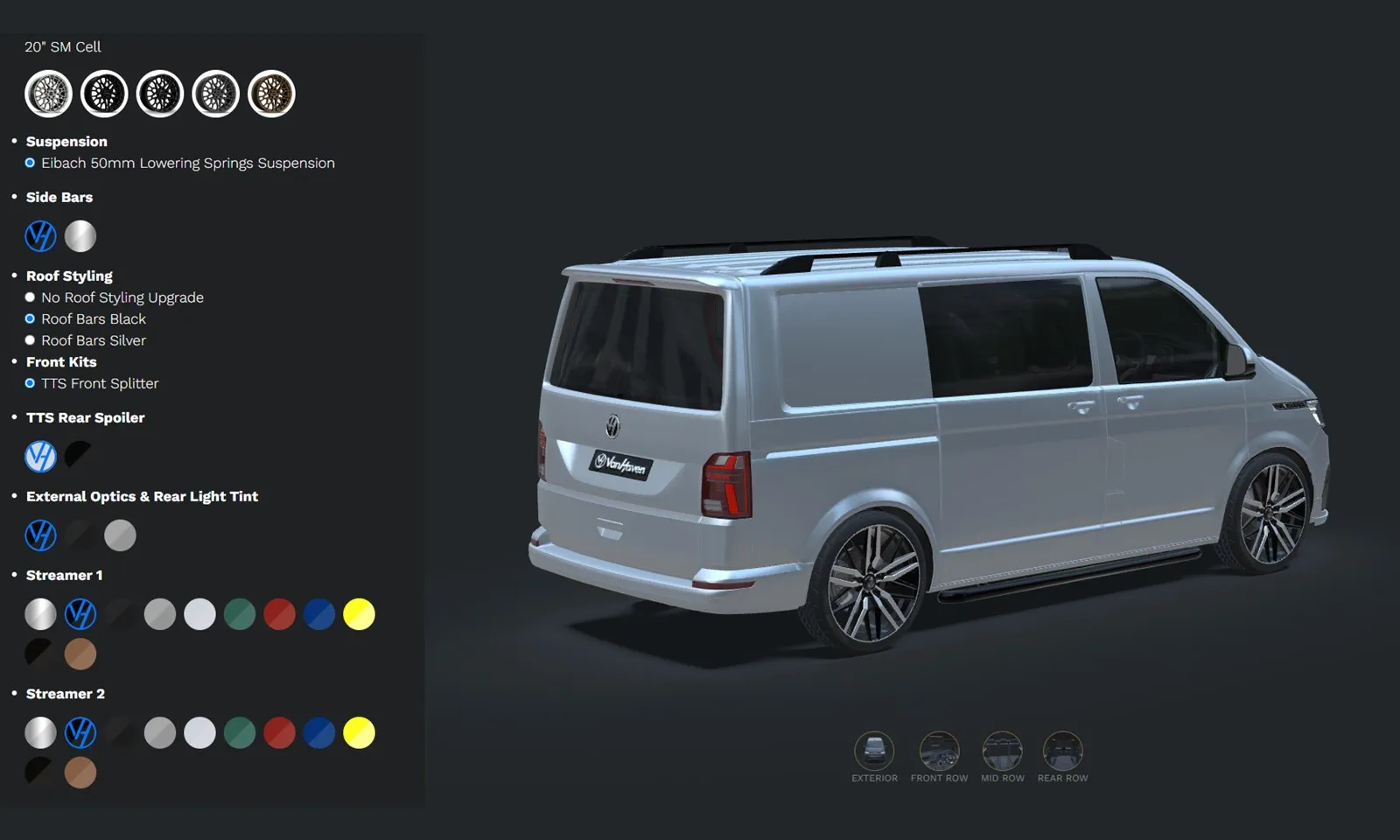
For complex products, presets can go further and point at specific areas: the interior of a van conversion, a door's hardware, a trailer's coupling. In VanHaven's 3D van configurator, the 360-degree view and a custom camera system work alongside a branded PDF brochure of the exact build, so the buyer can bring what they saw on screen to a consultation. Hulck's industrial trailer configurator uses a 360-degree view across 23+ configurable attributes, so a buyer can check chassis, body, axles and accessories before sending a quote request.
Where AR product visualization fits in the buying journey
AR product visualization places the 3D model in the buyer's real space through their phone camera. It fits late in the buying journey, when the buyer has picked a configuration and wants to check size and fit in the room, driveway or doorway where the product will go.
On phones, AR usually runs through the operating system's own viewer rather than inside the web page:
- iPhone and iPad open USDZ files in AR Quick Look.
- Android opens glTF/GLB files in Scene Viewer.
- The WebXR browser API can run AR inside the page on supported Android browsers, though support is narrower.
In practice that means exporting the buyer's current configuration in the right format and handing it to the device. The same 3D assets drive the web view and the AR view, so AR extends the visualization work you already have.
AR helps most with products where scale is the open question: furniture, large equipment, anything that has to fit a measured space. It helps least with products where the buyer cares about technical detail they can already see on screen. It works best as a confirmation step after the buyer has finished configuring. For one furniture client, we delivered three configurators with live pricing and AR, where the configured product goes into the store's WooCommerce cart with its full specification. You can read how it works in the furniture configurator case study. AR view-in-room on mobile is part of our Professional tier.
What is a 3D product configurator and when does a manufacturer need one?
A 3D product configurator is a WebGL product visualization with the product's options, rules and pricing built in, so the buyer can design a valid configuration, see it in 3D and send it to you. A viewer answers "what does this look like?" A configurator answers "what exactly am I ordering, and what does it cost?"
| 3D product viewer | 3D product configurator | |
|---|---|---|
| What the buyer does | Rotates and zooms one product | Chooses options and builds their own version |
| Options | None or very few | Materials, dimensions, components, accessories |
| Rules | Not needed | "Not with" and "requires" relationships between options |
| Price | Static or absent | Live, updated per choice |
| Output | None | Quote request, cart item, spec PDF or CRM record |
| Typical fit | Fixed products with a few variants | Made-to-order and high-value configurable products |
A manufacturer needs a full configurator when most of these are true:
- The product has several independent choices, and the combinations number in the dozens or hundreds.
- Some combinations cannot be built, and buyers currently find out from a salesperson.
- The price depends on the choices, and quoting it takes your team time.
- Orders or quote requests arrive incomplete and need back-and-forth to pin down.
- The product is expensive enough that the buyer wants to see their exact version before committing.
If only the first point applies, a viewer with a few material swaps may be enough. If the price and the rules matter, the configurator is where the value is. Our 3D product configurator development page describes how we scope that work, and the cost guide explains what moves the budget.
How a WebGL product visualization project comes together
A WebGL product visualization project runs from one real product's data to a tested component on your site. Most projects follow the same six steps, whatever the product.
- Pick one product. Start with your best-selling or most-quoted product. It gives you something real to evaluate before you commit to the whole range.
- Collect the inputs. Photos, CAD files or drawings (or just dimensions if that is all there is), the full option list, which combinations are not allowed, and the pricing rules. A spreadsheet is fine for the last two.
- Build or convert the 3D model. Model in Blender, or convert and simplify CAD. Split the model into the parts that change, and set up materials so they can be swapped by code. Export to glTF/GLB.
- Write the configuration logic. Turn the option list and rules into data: what can be chosen, what each choice changes on the model, what it costs, and what it rules out. This is where a configurator's accuracy is decided.
- Build the viewer and interface. Render the model with Three.js (we use React Three Fiber in React and Next.js projects), add camera presets, option controls, dimensions and the live price, and make it work by touch on a phone as well as with a mouse.
- Connect the output and ship. Send the finished configuration where orders are handled: a cart, a quote request, a CRM or ERP record, or a spec PDF. Test on real devices, then deploy inside your existing site.
The $2,500 Pilot covers this path for one product in about two weeks, with 3D modeling, color and material customization and live pricing included. The full fee is credited toward a full build within 6 months. Focused full builds typically launch in about 4 to 8 weeks, and complex ones with a pricing engine, quote backend or deep integration take around three months. Our process page has the detail.
Common mistakes in WebGL product visualization
Most problems with 3D product pages come from a few repeated decisions.
- Loading the 3D scene before the page. A product page that waits for a heavy 3D model before showing any text loads slowly and gives search engines little to read. Render the copy on the server, then load the 3D view lazily.
- Shipping CAD-weight models. Engineering models carry detail no buyer will see and that phones cannot render smoothly. Simplify and compress for the web.
- Unlimited options with no rules. If the tool lets buyers combine options you cannot build, every quote becomes a correction. Encode the constraints and explain them in the interface.
- A free camera with no presets. Buyers get lost, zoom inside the model or end up looking at the floor. Limit the orbit and give them a few good angles one tap away.
- Testing only on a fast desktop. Mid-range phones are where 3D pages fail. Test touch controls, load time and frame rate on real devices.
- A visualization that ends nowhere. If the buyer finishes a configuration and the only next step is a blank contact form, the work they just did is lost. Send the configuration with the enquiry.
WebGL product visualization by product type
The same techniques apply across industries, but each product puts the weight in a different place.
Furniture
Materials and scale carry most of the decision. Fabric and wood need convincing textures, dimensions need to be visible, and AR helps buyers check fit in the room. Modular products need layout rules. Our furniture work and the sofa demo show both.
Vans and vehicles
Interiors, accessories and paint matter, and buyers often decide in a consultation. A 360-degree view, camera positions for the interior and a shareable brochure of the exact build bridge the website and the showroom, as in the VanHaven case study. See our automotive work.
Doors and windows
Options are deeply dependent: a series determines available sizes, glass and hardware. A guided step-by-step flow with live pricing keeps buyers on valid paths. The door configurator case study covers a build with option dependencies across nine door series and a full quote management system. More on our doors and windows work page.
Trailers and industrial equipment
Technical specification drives the sale. Buyers need to check chassis, axles and accessories from every side, and the quote request has to carry the full build. See the Hulck trailer case study and our industrial work.
Sports surfaces and branded products
Layout, colors and logos are the product. Procedural geometry and logo projection let buyers design a court that does not exist yet, as in Baseline Courts' basketball court designer. See our sports work.
Where to start
If your buyers are asking "what will mine look like?" and "what will it cost?", pick the one product that generates the most of those questions. Try the sofa demo to see the kind of experience we build, compare building versus buying a configurator platform if you are weighing a SaaS tool, and then email us the product details: photos or CAD, the option list and your pricing rules. We will reply with what a Pilot for that product would include.
Frequently asked questions
What is WebGL product visualization?
Do customers need to install anything to see a WebGL product viewer?
Is WebGL product visualization fast enough on mobile?
What is the difference between a 3D product viewer and a 3D product configurator?
Can I see WebGL product visualization in AR?
How do I start a WebGL product visualization project?
Have a product like this?
Email us the details. We'll map out what a configurator could do for your product, zero obligation.