3D Door Configurator Case Study: A 7-Step Guided Wizard for Premium Slimline Glass Doors
How we built a 3D door configurator for an Australian slimline glass door maker: 7-step guided wizard, live pricing, real-time glass rendering, cost, timeline.
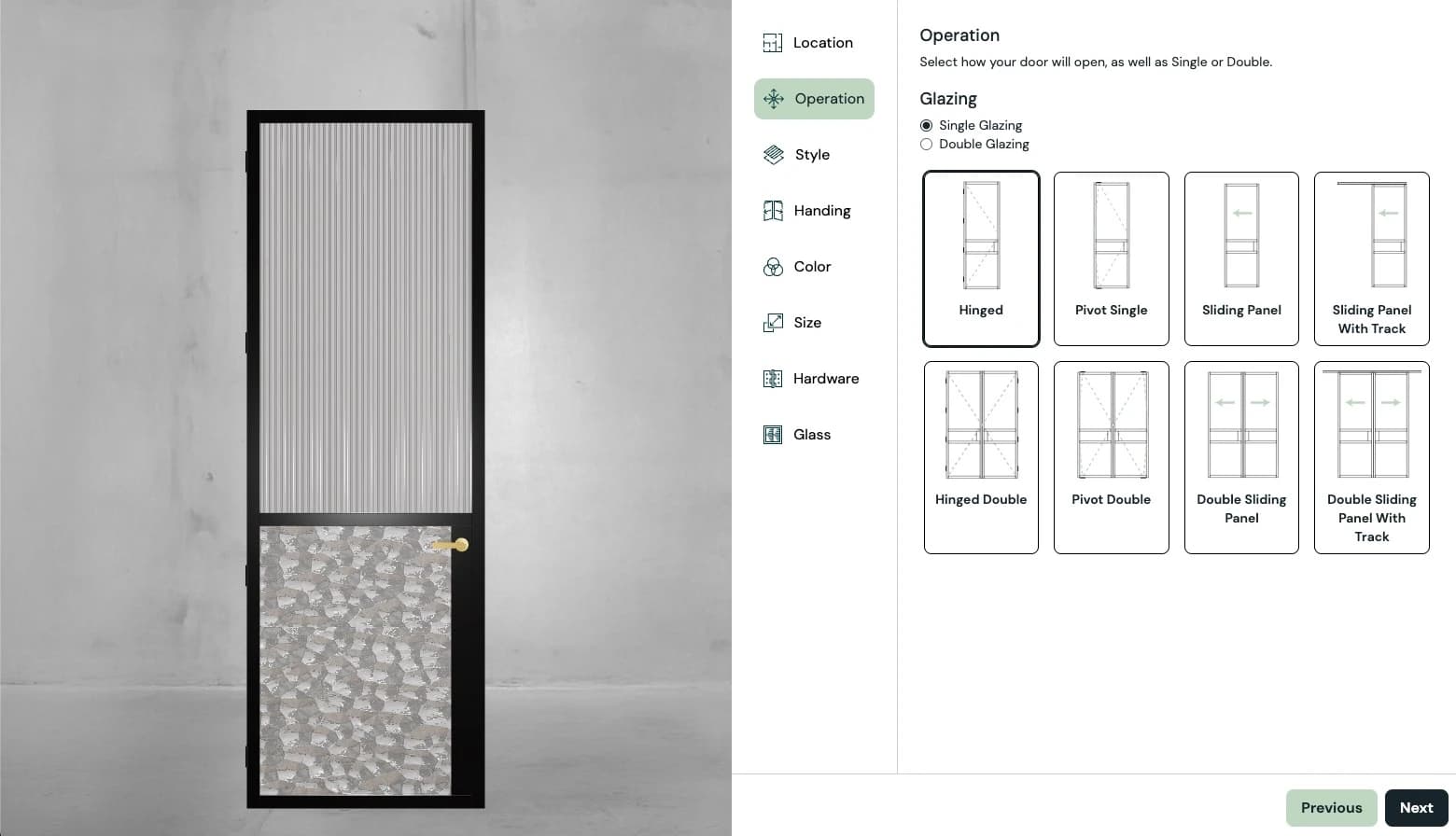
This case study covers a premium Australian slimline glass door manufacturer: pivot doors with European-engineered hardware, hinged doors, arched variants, and soft-close sliders. Every door is made to order across nine distinct series, with options for glass type, aluminium finish, hardware, handing, and custom dimensions.
They're a boutique manufacturer competing against the larger national door brands. Not on scale, but on design quality, craftsmanship, and the kind of attention that a small operation can give to every order.
But selling a premium custom door online presents a specific challenge: the product only exists once it's been manufactured to the customer's exact specification. There's nothing on a shelf to photograph. Every door is unique.
Watch the 7-step wizard configure a pivot door end to end: series, colour, size, hardware, and glass, with live pricing.
The Challenge
The product range is deep. Nine door series, each with different structural profiles. Multiple glass types including reeded and frosted options. A range of aluminium finishes. Left or right handing. Custom dimensions down to the millimetre. Several hardware options per series.
The number of possible configurations runs into the thousands. No amount of photography can cover that. And unlike a standard off-the-shelf door, there's no way for a customer to walk into a hardware store and see their exact specification.
Before the configurator, the buying process worked the way it does for most custom door manufacturers: the customer visits the showroom, browses samples, talks through options, and eventually receives a quote. It works, but it limits the sales process to showroom hours, showroom locations, and the availability of the sales team.
The manufacturer needed a tool that would:
- Walk customers through every decision in a logical sequence. No overwhelming option grids
- Show the door updating in real-time 3D as each choice is made
- Calculate and display live pricing based on the selected configuration
- Let customers submit their configured door as a quote request
This wasn't just a visualisation tool. It was a complete guided-selling and quoting system built around a real-time 3D frontend.
What We Built
The configurator serves as a customer-facing design tool linked from the manufacturer's main website. It guides customers through the full specification of a door, from series selection to hardware, in a structured, step-by-step flow.
The 7-Step Guided Wizard
Configuring a custom door involves dozens of interdependent decisions. Presenting them all at once would overwhelm most customers. Instead, the configurator uses a guided wizard that walks through seven steps in sequence:
- Location: where the door will be installed, which determines structural and compliance requirements
- Style: the door series and type (pivot, hinged, arched, slider), each with a different 3D model and set of available options
- Handing: left or right opening, reflected in the 3D preview so the customer can verify it matches their floor plan
- Colour: aluminium frame finish, applied to the 3D model in real time
- Size: custom width and height dimensions, with the 3D model scaling to reflect exact proportions
- Hardware: handle style and finish, swapped on the 3D model
- Glass: glass type selection (clear, reeded, frosted, tinted), with the 3D material updating to show transparency, texture, and light behaviour
Each step reveals only the choices relevant to that stage, and each choice narrows the options available in subsequent steps. Selecting a pivot door shows pivot-compatible hardware. Choosing a specific series determines which glass types are available. The wizard manages this complexity so the customer doesn't have to.
The 3D preview updates at every step. By the time the customer reaches the end, they've seen their exact door take shape (series, finish, glass, hardware, dimensions) rendered from multiple angles.
Live Pricing
This is where the configurator crosses from visualisation tool into commercial infrastructure. As the customer makes each selection, the price updates in real time. Change from clear glass to reeded? The price adjusts. Increase the width by 200mm? The price recalculates. Select premium hardware? Updated instantly.
Live pricing does two things. First, it eliminates the wait-for-a-quote bottleneck that slows down every custom product sale. The customer doesn't need to submit a form and wait 48 hours to find out if their preferred configuration fits their budget. They know immediately.
Second, it encourages experimentation. A customer who sees that reeded glass adds $X to the price can make an informed decision on the spot, and they're more likely to choose the upgrade when they can see the visual difference in 3D alongside the exact cost impact. This naturally drives higher average order values.
3D Rendering
The 3D engine is built with React Three Fiber, the React renderer for Three.js, giving us the performance of WebGL with the component architecture of React. This was the right choice for a configurator with this level of UI complexity.
The rendering handles several technically demanding requirements:
- Glass materials: slimline glass doors are defined by their glass. Rendering clear, reeded, frosted, and tinted glass convincingly in real time requires careful work with transmission, roughness, refraction, and environment mapping. The glass needs to look like glass, not like a flat texture.
- Aluminium finishes: the frame finishes range from matte to brushed to anodised. Each needs distinct reflectivity and surface properties to communicate the difference between finishes.
- Dynamic dimensions: the door model scales based on customer-input dimensions, which means geometry, frame proportions, and glass panel sizing all adjust parametrically
- Hardware swaps: handle models are loaded and positioned correctly on the door based on handing and style selection
The result is a 3D preview that communicates not just shape and colour, but the material quality that defines a premium door. For a product where the visual distinction between finishes justifies a significant price difference, that rendering quality directly supports the sale.
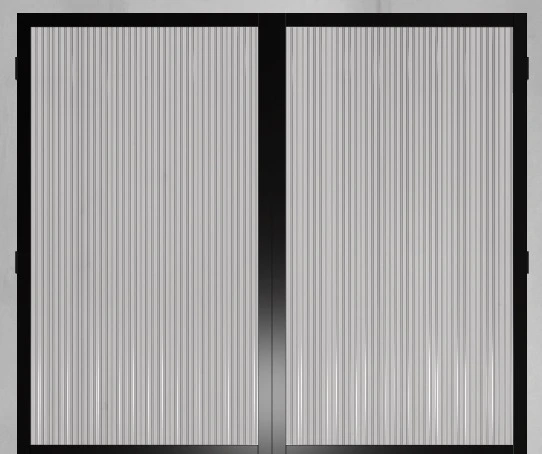
Reeded glass: the vertical ribbing that distinguishes the reeded option from clear or frosted glass.
Quote System
At the end of the wizard, the customer can submit their configured door as a formal quote request. The submission includes the full specification (series, dimensions, glass, finish, hardware, handing) alongside the calculated price and the customer's contact details.
Every quote that arrives is a qualified lead with a complete specification. The sales team doesn't need to spend the first conversation establishing what the customer wants. They can go straight to confirming details, discussing installation, and closing the order.
Technical Architecture
For technical decision-makers evaluating a similar project, here's how the system is structured.
Frontend
Built with React and Vite for fast development and optimised production builds. The 3D rendering layer uses React Three Fiber, which integrates Three.js into the React component lifecycle. This means the 3D scene is managed declaratively: door components, materials, lighting, and camera positions are React components that update reactively when configuration state changes.
The guided wizard UI, option selectors, pricing display, and quote form are standard React components. State management coordinates between the wizard steps, the pricing engine, and the 3D scene, ensuring that every selection is reflected simultaneously in the UI, the 3D preview, and the calculated price.
Backend
Express.js serves as the API layer, handling:
- Product and option data delivery to the frontend configurator
- Pricing calculation and validation
- Quote submission processing
- CRUD operations for products, options, and pricing rules
Separating the backend from the frontend means the pricing engine and quote system can evolve independently of the customer-facing UI. Backend changes don't require frontend redeployment, and frontend UX improvements don't risk breaking the pricing engine.
Why React Three Fiber
For the Baseline Courts project, we used vanilla Three.js because the scene was procedurally generated and the UI was simple. For this project, the calculus was different.
The door configurator has a complex, multi-step UI with interdependent state across seven wizard steps, a pricing engine, and a 3D scene. React's component model and state management handle this complexity naturally. React Three Fiber lets the 3D scene participate in that same state flow. When the user selects a new glass type, the React state update propagates to both the pricing component and the Three.js material, in a single render cycle.
The alternative, vanilla Three.js with a separate React UI, would have required a manual synchronisation layer between the 3D scene and the application state. React Three Fiber eliminates that entirely.
How It Fits the Business
The Showroom, Extended
The manufacturer has physical showrooms across Australia. The configurator doesn't replace them. It extends the showroom to every device, every time zone, and every stage of the buying journey.
A homeowner can design their pivot door at midnight. An architect can spec a slider for a client presentation. A builder in a regional area can configure and price a door for a quote without driving to a showroom. The configurator makes the full product range accessible to anyone in Australia. Not just those within driving distance of a showroom.
Pricing Transparency as a Selling Point
In an industry where "request a quote" is the norm and pricing is opaque, live pricing is a competitive advantage. Customers don't like waiting for a quote to find out if something is within budget. The configurator answers the price question immediately, and in doing so, removes one of the biggest sources of friction in the custom door buying process.
This is especially powerful against the larger competitors. The bigger national brands don't offer this level of pricing transparency online. For price-conscious customers and time-pressed builders, that transparency is a reason to choose a boutique manufacturer over a bigger brand.
Competing as a Boutique Manufacturer
A small team competing against much larger national manufacturers can't win on scale. But they can win on experience.
The configurator is that experience. It communicates design quality, technical sophistication, and customer-centricity in a way that a static brochure never could. When an architect is choosing between a mass-market door and a door they've already designed in 3D, the configured option has a significant psychological advantage.
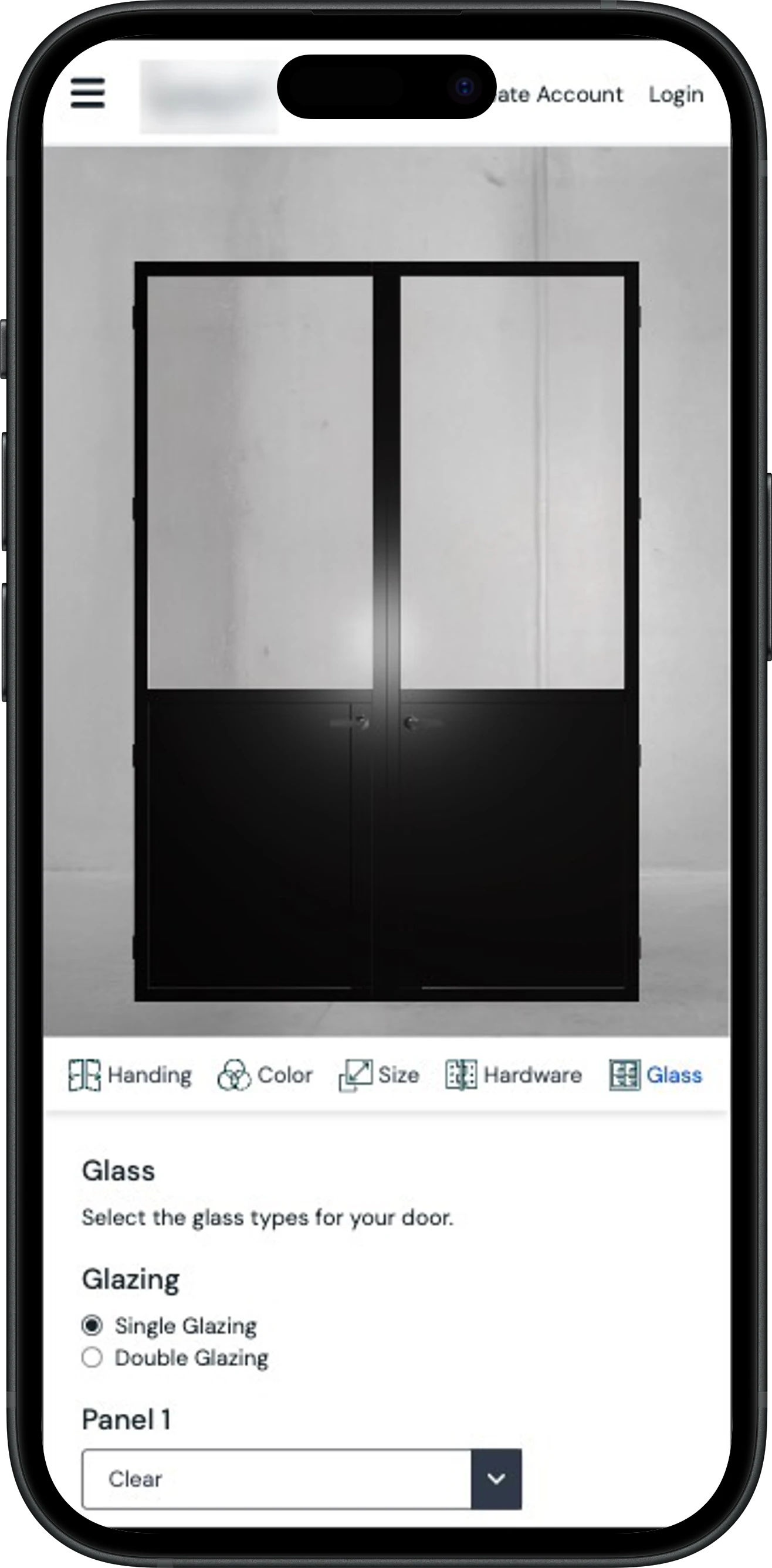
The configurator on mobile: a customer working through the Glass step, setting glazing and panel type per pane, no desktop or showroom required.
Project Scope and Timeline
The project was delivered in approximately three months from kickoff to launch, falling within our Enterprise tier. The Enterprise scope was driven by the backend complexity: a flexible pricing engine, cross-step option dependency logic across nine door series, and full quote management are systems that go well beyond a standalone configurator.
The major engineering challenges included:
- Glass material rendering: achieving convincing real-time glass across multiple types (clear, reeded, frosted, tinted) with accurate transmission, roughness, and environmental reflections
- The pricing engine: building a flexible calculation system that handles base prices, dimensional scaling, option surcharges, and series-specific pricing rules
- Option dependency management: ensuring that each wizard step correctly filters available options based on previous selections, and that this logic stays in sync between frontend validation and backend data
- Quote data integrity: ensuring every submitted quote captures the exact configuration and price shown to the customer, with no drift between what's displayed and what's recorded
What Other Businesses Can Learn
This configurator works because it solves three problems at once: visualisation, pricing, and specification complexity. That combination is relevant to any manufacturer where:
- The product is made to order: there's nothing on a shelf to photograph or ship. Every unit is manufactured to the customer's specification
- Pricing is complex: based on dimensions, materials, options, and dependencies. Too complex for a simple price list, too important to hide behind "request a quote"
- Options have dependencies: not every combination is valid. Compatibility between series, finishes, and hardware needs to be encoded so customers can't select an invalid combination
- The sales process is consultative: the configurator doesn't replace the conversation, but it makes every conversation start from a position of clarity
Windows, kitchens, wardrobes, cabinetry, modular buildings, architectural facades: any made-to-order product with complex pricing and visual customisation is a candidate for this approach. The same applies to B2B industrial products, D2C furniture brands, and live-configuration vehicle builders: different audiences, same underlying problem. Not sure whether to build or subscribe? Our build-versus-buy breakdown covers when each approach makes sense.
The Bottom Line
This 3D door configurator is more than a visualisation tool. It's a guided selling system, a 7-step wizard that walks customers from initial interest to a fully specified, accurately priced quote request. It gives a small manufacturing team the digital infrastructure to compete with brands many times their size.
Configure a slimline pivot door and see what a full-stack 3D configurator can do for a custom manufacturing business.
Frequently asked questions
How much does a custom 3D door configurator cost to build?
How long does it take to build a door configurator like this?
How does live pricing work for a made-to-order product like this?
Why React Three Fiber instead of a SaaS configurator platform?
Does a 3D configurator replace the showroom or the sales team?
Have a product like this?
Email us the details. We'll map out what a configurator could do for your product, zero obligation.
Related reading