The Complete Guide to Three.js Product Configurator Development
Learn how to plan, build, integrate, test, and maintain a Three.js product configurator for complex products and option rules.
A product team can spend weeks preparing a beautiful 3D model, then discover that the model cannot represent a valid door size, calculate a quote, or explain why a hardware option is unavailable. A Three.js product configurator solves that problem by connecting interactive product visualization to product data, business rules, and backend systems.
The rendering layer matters, but it is only one part of Three.js configurator development. The scene, option state, validation rules, pricing data, APIs, and ownership model must work together from the first planning session. How that rendering layer works in the browser is covered in the WebGL product visualization guide.
Quick answer
Build the configurator as a layered application. Keep product definitions and configuration state independent from React components and mesh references. Load predictable glTF assets, evaluate options through a dedicated rule engine, render the approved state with Three.js or React Three Fiber, and send a versioned payload to authoritative backend systems.
Start with one representative product path. Use it to prove the asset structure, option rules, quote or commerce API, responsive behavior, and ownership arrangements before expanding across a catalog.
When not to build a custom Three.js configurator
A custom build earns its place when the product has meaningful visual or logical variation. It can be unnecessary overhead when the customer only needs to rotate a finished model or select a small number of ordinary variants.
- Use a static viewer when the model has no selectable parts, dependent options, or downstream data.
- Choose an existing commerce variant system when every combination already maps cleanly to a supported SKU and the visual change is minor.
- Delay a 3D build when the manufacturer has no reliable product data, approved imagery, or decisions about valid combinations.
- Reconsider the scope when the business cannot provide an authoritative source for price, inventory, eligibility, or quote validation.
These boundaries protect the project from becoming an expensive interface around unresolved product decisions. If a cabinet width changes the available doors and hardware, custom logic probably belongs in the plan. If a customer only needs a 360-degree view, a smaller implementation may be the better decision. The build versus buy guide compares a hosted platform with a custom build when that is the actual decision.
Why a 3D product configurator needs more than a 3D model
A static 3D viewer loads a scene and gives the user camera controls. A visual customizer adds choices such as colors, fabrics, or accessories. A transaction-ready configurator adds state management, validation, pricing or quotation data, saved configurations, and connections to systems that handle the next business action.
Consider a hypothetical cabinetry manufacturer. A user chooses a width of 900 mm. The application must update the valid door sizes, remove incompatible hardware, update the displayed finish, request the appropriate price data, and create a clean quote payload. A model viewer cannot perform that work by itself.
The glTF 2.0 specification defines a structure for scenes, nodes, meshes, materials, textures, and related data. Those structures affect how developers identify a cabinet side panel, apply a material to a door group, or attach an optional handle. A poorly named scene graph turns every visual option into a fragile special case. See the glTF 2.0 specification when defining the asset contract.
| Type | What it does | What it usually lacks |
|---|---|---|
| Static viewer | Loads and displays a fixed model | Product rules, quote data, option validation |
| Visual customizer | Applies finishes or swaps visible parts | Authoritative pricing and order validation |
| Product configurator | Combines visual state, rules, data, and integrations | Nothing by default; scope must be defined |
A scene graph becomes part of the product API when business options depend on its nodes, materials, and attachment points.
Choose the application architecture before building the scene
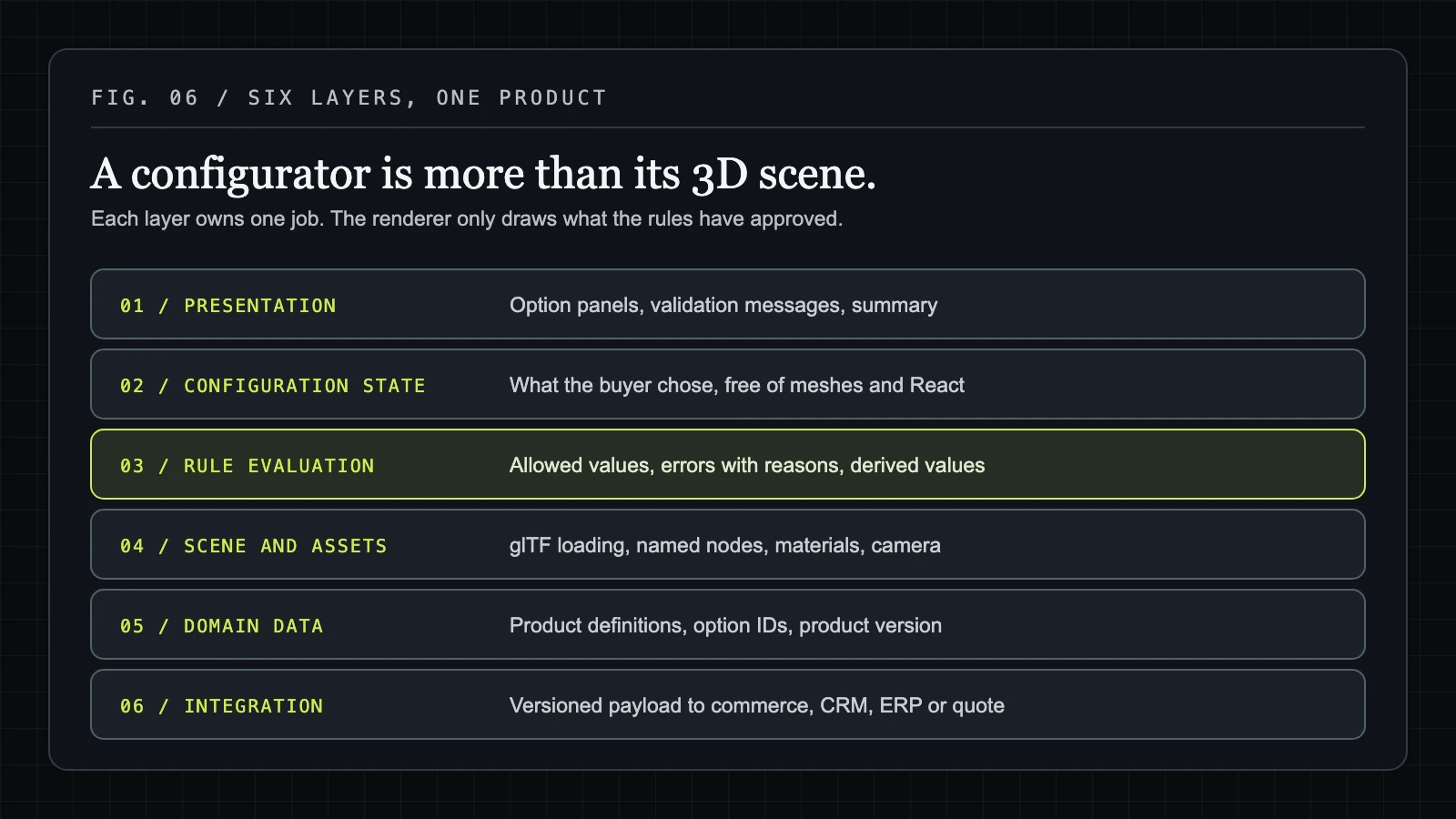
Without a defined architecture, teams place product rules inside click handlers, store business data in mesh references, and let the interface become the only source of truth. A recommended Three.js configurator architecture separates concerns while keeping the data flow easy to trace.
Use six layers: presentation, configuration state, rule evaluation, scene and asset management, domain data, and integration services. Product definitions should live in data files or backend responses rather than inside React components. The scene renderer should receive approved state and apply it; it should not decide whether a product combination is legal.
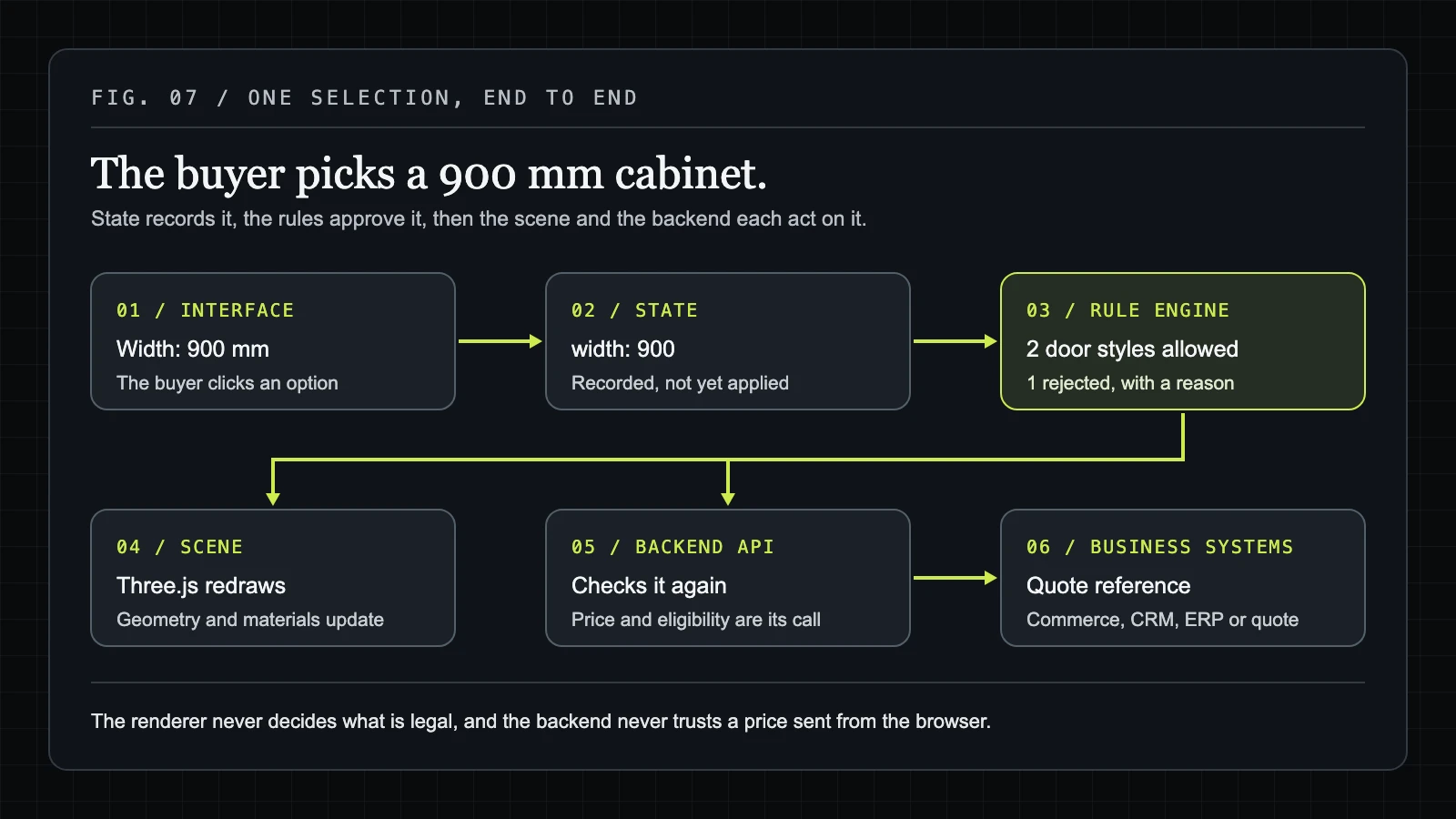
The flow is straightforward. A user changes an option in the interface. Configuration state records the selection. The rule engine returns available options, errors, and derived values. The scene renderer applies visual changes, while the integration layer sends a versioned payload to commerce, CRM, ERP, or quoting systems.
Three.js controls the WebGL rendering process through objects such as WebGLRenderer, which manages output, capabilities, and renderer settings. Its documentation describes constructor parameters and properties including pixel-related capabilities and debug settings in the WebGLRenderer documentation. Those renderer responsibilities should stay separate from pricing and eligibility decisions.
For a hypothetical kitchen configurator, the UI might send width: 900 to state. The rule layer approves two door families and rejects a third. The scene layer updates cabinet geometry and materials. The quote service receives the selected identifiers and product version, then performs its own validation.
Build the 3D asset pipeline around glTF and predictable scene structure
Asset problems often appear before code problems. A model may look correct in a 3D package yet fail in the browser because optional parts share one mesh, materials use inconsistent names, or textures point to local file paths.
glTF is a practical delivery format for web-based product models because it represents scenes, nodes, meshes, materials, and textures in a structure Three.js can load. GLTFLoader is an addon that must be imported explicitly. Its documented load, parse, and asynchronous parsing methods support loading a file or parsing supplied data. See the official GLTFLoader documentation.
Set conventions before artists prepare a catalog. Name selectable nodes such as sofa_frame, sofa_legs, and chaise_left. Name material zones such as fabric_main and wood_legs. Record attachment points, camera anchors, optional components, model variants, and texture paths in a handoff document.
For a hypothetical sofa, the scene might contain separate nodes for the frame, legs, cushions, left and right fabric zones, and accessory modules. Selecting a leg finish then targets the named leg group rather than searching for a mesh by position or relying on an index that changes after export. A working example of separate choices on one model is the modular sofa demo: layout, seat count, fabric, and legs.

- Prepare geometry at a level appropriate for the target devices rather than applying one fixed polygon budget to every product.
- Check texture dimensions, color management, material consistency, and external paths after export.
- Test optional combinations together, since each part may load correctly alone but create excessive memory or draw-call pressure in combination.
- Validate the model in the actual loader and browsers used by the project.
CAD or 3D teams should deliver an approved source model, an export, a node and material map, and a list of known limitations. Developers should return validation findings before the catalog expands.
Design React Three Fiber configurator components around product state
React Three Fiber is a sensible abstraction when the surrounding application already uses React and needs shared component patterns for the interface, routes, state, and scene. It is not an official replacement for Three.js. A small framework-neutral viewer may use direct Three.js APIs with less surrounding structure.
Good React Three Fiber configurator components have narrow jobs. A canvas owns the render surface. A model loader handles asset loading and disposal. Selectable part components map product identifiers to scene nodes. A material applicator changes approved materials. Camera controls manage framing. Option panels, validation messages, and configuration summaries remain ordinary interface components.
Keep state independent from mesh references. A selection such as upholstery: "navy-wool" should survive a model reload, route change, or responsive layout change. Mesh objects are temporary rendering resources; product selections are domain data.
For a hypothetical sofa, the material selector first dispatches a state update. The rule engine confirms that navy wool is available for the selected range. The material applicator then finds the fabric_main group and assigns the mapped material. The selector does not reach directly into a mesh during its click event.
const configuration = {
  productId: "sofa-01",
  productVersion: "2026-01",
  options: {
    seatCount: "three",
    upholstery: "navy-wool",
    chaise: "left",
  },
};
This separation also makes URLs, analytics, saved configurations, and API payloads consistent. The same state object can describe what the customer selected even when the scene has not finished loading.
Put product logic in a configuration rule engine
Click handlers are a poor home for product logic. They know which button the user pressed, but they rarely provide a complete record of why an option was hidden, rejected, or changed. A dedicated configuration rule engine for product options gives the manufacturer a traceable model.
Represent each option with an identifier, allowed values, dependencies, exclusions, default values, visual mappings, and downstream identifiers such as SKU or quote attributes. Keep visibility rules separate from compatibility rules. Required selections, quantity constraints, and pricing or quotation logic also deserve separate rule types.
Rules should evaluate deterministically. Given the same product version and selections, the engine should return the same available controls, derived values, and errors. When a selection fails, return a user-readable reason such as "A double door needs a cabinet at least 600 mm wide," rather than silently removing the control.
Return to the hypothetical cabinetry manufacturer. A 300 mm base unit only takes a single door under the manufacturer's product rules. A 900 mm unit takes either a double door or a single door over a drawer bank, but a particular sink fitting requires the double door. When the user changes the width, the engine recalculates the available door layouts before the renderer changes the scene.
| Option | Condition | Result |
|---|---|---|
| Double door | Width is 900 mm | Compatible |
| Double door | Width is 300 mm | Incompatible with reason |
| Interior LED strip | Glass-front door selected | Conditionally visible |
| Handle finish | Always required | Default value required |
The manufacturer's product team must confirm which rules represent manufacturing reality and which are sales or quotation policy. Client-side rules improve the experience, but they cannot replace backend validation for price, eligibility, inventory, or order acceptance.
A useful rule engine explains invalid combinations; hiding the control alone leaves the product decision impossible to audit.
Choose integration patterns that keep the configurator connected to business systems
Integration design decides whether the configurator remains a visual front end or becomes a dependable part of the sales process. The right Three.js configurator integration patterns depend on authentication, data ownership, validation, and operational complexity.
| Pattern | Good fit | Main control point |
|---|---|---|
| Browser to API | Simple authenticated quote or save action | API validates every request |
| Backend for frontend | Several systems need one tailored contract | Server owns mapping and credentials |
| Event or webhook handoff | Completed configurations trigger downstream work | Events need retries and idempotency |
A stable payload should carry a product ID, product version, selected option IDs, quantities, generated SKU or variant information where available, display metadata, and a configuration identifier. Keep display data separate from values that a backend treats as authoritative.
{
  "productId": "kitchen-range-01",
  "productVersion": "2026-01",
  "configurationId": "saved-example-001",
  "options": [
    { "id": "cabinet-width", "value": "900" },
    { "id": "door-style", "value": "shaker-white" },
    { "id": "hardware", "value": "brushed-steel" }
  ],
  "quantities": { "base-unit": 4 },
  "variantId": null,
  "display": { "label": "900 mm kitchen run" }
}
In a hypothetical kitchen flow, the browser stores a shareable configuration URL. When the user requests a quote, the backend receives the payload, rechecks dimensions and eligibility, calculates or retrieves authoritative data, and returns a quote reference. If the browser displays a price that the backend rejects, the interface should show the correction and preserve the user's selections for review.
Plan performance around loading, rendering, and device limits
A product can render well on a developer laptop and fail on a phone once several optional parts and high-resolution textures load together. Treat performance as a testable acceptance area, not a final polish task.
Control the main costs: asset detail, compressed geometry, texture dimensions, draw calls, material count, lazy loading, cache behavior, and disposal of unused scenes and textures. Renderer settings also matter. Pixel ratio, shadows, antialiasing, post-processing, and tone mapping trade visual quality against device cost.
The Three.js WebGLRenderer documentation describes renderer configuration and capabilities. MDN's WebGL best practices advises eliminating WebGL errors, handling resource limits, and adapting when extensions or hardware capabilities differ.
| Test dimension | Example coverage | Acceptance evidence |
|---|---|---|
| Device | Desktop, integrated graphics, current mobile devices | Recorded render behavior and error log |
| Network | Fast connection and constrained mobile connection | Loading state and recovery behavior |
| Asset state | Base model, largest option set, multiple accessories | No runaway memory or missing parts |
| Renderer | Pixel ratio, shadows, antialiasing settings | Project-specific visual and interaction targets |
For a hypothetical trailer configurator, one base trailer may feel responsive, while a loaded configuration containing cabinetry, flooring, appliances, and lighting causes context loss or stalled interaction. The fix may involve lazy-loading accessory groups, reducing texture dimensions, disposing old resources, or offering a simpler mobile scene. Set targets with the project team; do not publish invented FPS or load-time promises.
Estimate a product configurator build timeline by workstream
A product configurator build timeline becomes useful when each phase ends with an accepted output. Calendar promises hide dependencies such as missing assets, unresolved rules, or an ERP team that has not approved the API contract.
Plan these workstreams separately:
- Discovery and product modeling: identify configurable dimensions, valid combinations, owners, and source data.
- Asset preparation: clean models, define node conventions, export glTF or GLB, and validate materials.
- Interaction design: map steps, option controls, error messages, camera behavior, and responsive states.
- Configuration logic: implement defaults, dependencies, exclusions, derived values, and rule tests.
- Frontend implementation: connect state, scene components, loading states, accessibility work, and responsive layouts.
- Integration: agree payloads, authentication, quote or commerce endpoints, saved links, and failure handling.
- Testing and launch support: run the device matrix, end-to-end product paths, security checks, monitoring, and handover.
| Phase gate | Accepted deliverable | Dependency to clear |
|---|---|---|
| Architecture proof | One model loads with documented state flow | Approved technical direction |
| Representative product path | One complete product configuration works | Asset and rule decisions |
| Integration validation | Test payload reaches the approved endpoint | API contract and credentials process |
| Catalog rollout | Additional products follow the same conventions | Reusable asset and rule documentation |
The schedule changes with the number of configurable dimensions, source asset quality, rule complexity, pricing or ERP dependencies, approval cycles, and target devices. Client-side asset preparation and product-data cleanup should appear as separate work from engineering. This is planning guidance, not a guaranteed delivery estimate. What moves the price is covered in the 3D product configurator cost guide.
Protect code ownership, data ownership, and maintainability
Source files alone do not make a code-owned configurator. A brand needs access to the product schemas, rule definitions, assets, deployment setup, API contracts, tests, and documentation that determine how the system behaves.
Custom configurator code ownership should cover repository access, build configuration, deployment configuration, product data, rule files, 3D assets, third-party dependencies, licenses, environment access, test suites, and handover materials. Contract terms deserve legal review, especially where existing libraries, commissioned assets, or external APIs have separate license conditions.
Ask whether the team can inspect and export the configuration model, run tests, replace an asset, review a dependency, and deploy a release without a hosted black box. Ownership also includes a clear process for future changes, such as adding a finish or revising a dimension rule.
- Repository access with full history and build instructions.
- Asset archive with naming rules, export settings, licenses, and source files where agreed.
- Product schema and rule-engine documentation with a sample valid and invalid configuration.
- Deployment configuration, environment-variable process, dependency list, and release procedure.
- API contracts, test payloads, integration failure behavior, and support boundaries.
For a hypothetical handover, a new developer should be able to clone the repository, load the sample sofa configuration, identify the fabric_main node, run rule tests, and understand how a quote payload reaches the backend. If they cannot, the handover is incomplete.
Use a delivery checklist to evaluate a Three.js configurator project
Use acceptance criteria that describe observable behavior. A configurator is ready for wider rollout when representative product paths work under valid and invalid conditions, not when the default model looks attractive in a demo.
- Visual accuracy: approved geometry, materials, dimensions, camera views, and optional parts match the product data.
- Option validity: defaults, dependencies, exclusions, required fields, quantities, and user-readable errors have automated tests.
- Responsive behavior: controls, loading states, camera interaction, and summaries work across the agreed device matrix.
- Accessibility: interface controls, focus order, labels, errors, and non-3D alternatives receive testing against the chosen standard.
- Performance: representative assets, maximum expected combinations, resource disposal, WebGL errors, and recovery states are tested.
- Data integrity: configuration IDs, product versions, option IDs, quantities, and derived identifiers remain consistent.
- Integration: valid requests, rejected requests, authentication failures, timeouts, retries, and duplicate submissions have defined behavior.
- Security and maintainability: browser values are never trusted for authoritative price or eligibility, dependencies are recorded, and release steps are documented.
Test one complete path for a sofa, one for a kitchen, or one for the product that carries the most rule complexity. Include reloads, shared links, invalid combinations, API failures, incomplete assets, and the largest expected option set.
Choose a custom Three.js build when product rules, visual fidelity, integrations, and code ownership justify the engineering work. Choose a simpler viewer or existing variant system when the requirement stops at model inspection and a small set of independent choices.
That decision is the practical starting point for 3D product configurator development. The work can focus on custom Three.js architecture, asset preparation, configuration rules, React Three Fiber components, or integration with an existing website and business system. Start by validating one real product path and its data contract, for example through the $2,500 Pilot, then use the accepted result to guide the wider build.
References
Have a product like this?
Email us the details. We'll map out what a configurator could do for your product, zero obligation.